
Frequently Asked Questions
A common reason is due to Javascript being disabled. Most updated web browsers like Google Chrome, Mozilla Firefox and Opera should support Javascript out of the box. If you are using an outdated version of Internet Explorer, it may not support active scripting.
- Try another web browser mentioned above.
- If you are using a script blocking extension, please add the following domains to the whitelist.
- mmsis.com
- ajax.googleapis.com
- cloudflare.com
- jsdelivr.net
- If you are browsing the website from a company network, a firewall or security application may be blocking the connection. Please consult your IT to allow the connection.
The form may have field validation enabled, mandatory fields are typically labelled with red asterisk (*) and any incomplete fields will have a red outline.
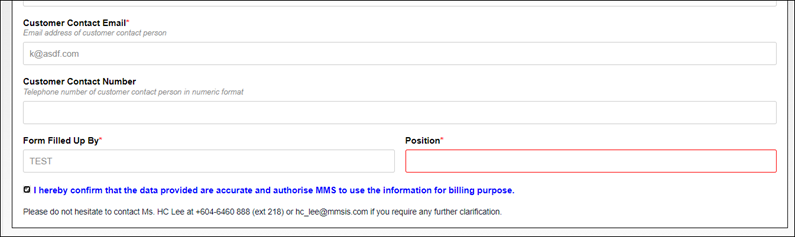
When all mandatory fields have been filled in, the SUBMIT button will appear.
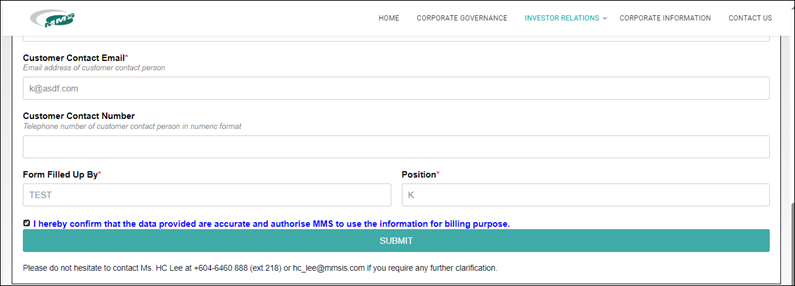
If all fields have been properly filled in, please check if there is any software blocking Javascript in the web browser. You may need to consult an IT personnel if unsure.
Google’s reCAPTCHA is used to prevent spam. While it usually does not require any user interaction, there are times when it detects some suspicious activities and prompt the user to solve a CAPTCHA (clicking some random images), before it accepts the submission.
If it keeps prompting to solve a CAPTCHA despite having solved one, please check the following:
- Use an updated web browser like Google Chrome, Mozilla Firefox and Opera.
- Make sure there is no security application or extension blocking Google reCAPTCHA.
- Your IP address may be blacklisted by Google. This usually occurs for those with dynamic IP addresses and there were past security incidents reported on the IP address you are currently using. Please try to reboot your modem (to obtain a different IP address) and retry. If that does not solve the issue, please get in contact with us.